Settings
Open Settings from the user menu (click your avatar in the top right corner). Settings are grouped into sections that you can jump to from the list on the left, and every change is saved as soon as you make it.
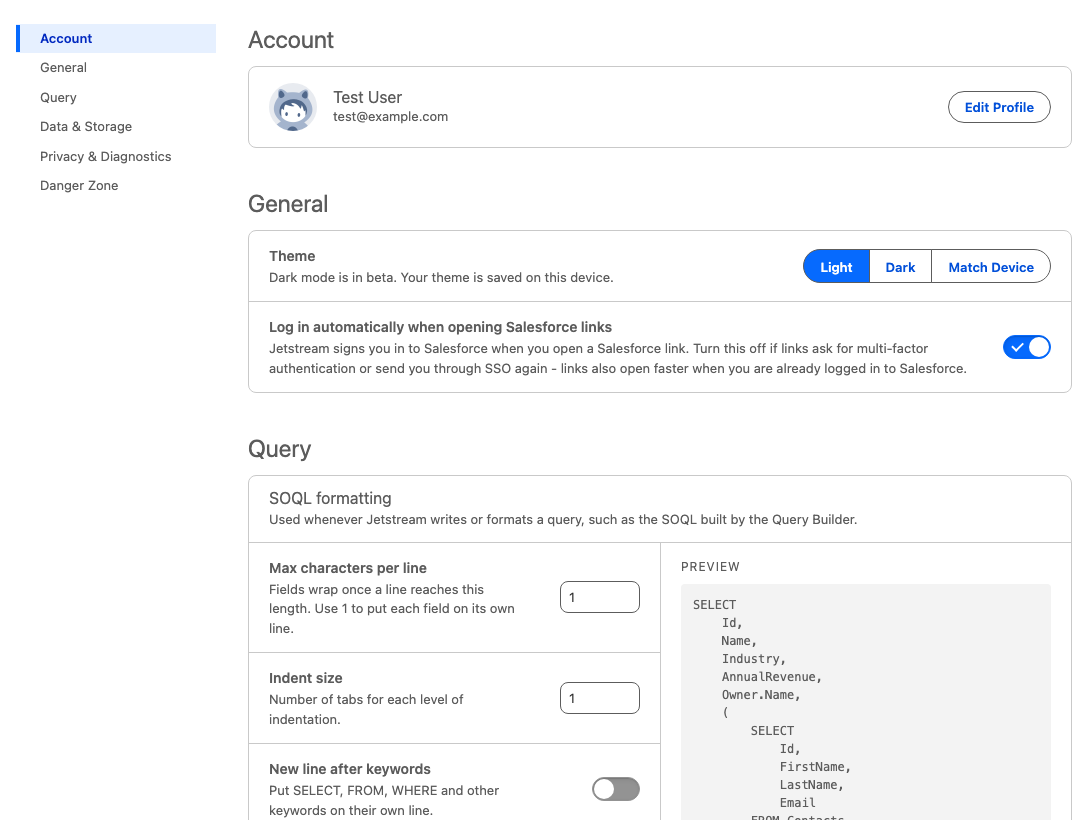
Account
Shows the account you are signed in with, including your team and role if you belong to a team.
- In the web app, Edit Profile opens your user profile, where you can change your name, password, multi-factor authentication, and linked accounts.
- The desktop app does not have a profile page, so this is where you can check which account is signed in. Manage Account opens your profile in your browser. To sign out, choose Logout from the user menu.
- Team administrators and billing users also see Team Dashboard, which opens the Team Dashboard (in your browser, when using the desktop app).
To see which account you are signed in with from anywhere in Jetstream, hover over your avatar or open the user menu - your email address is shown at the top of the menu.
General
- Theme: Choose Light, Dark (beta), or Match Device. The theme is saved on each device. You can also change it from the user menu.
- Log in automatically when opening Salesforce links: Jetstream signs you in to Salesforce when you click a Salesforce link in Jetstream.
- Turn this off if you have SSO or multi-factor authentication configured and clicking Salesforce links from Jetstream asks you to log in again.
- With this turned off, Salesforce links open faster as long as you are already logged in to Salesforce.
- Download updates automatically (desktop app only): Check for and download new versions in the background. If your organization manages updates for you, this setting is read-only.
- Download location (desktop app only): Choose a folder to save downloads to without being asked each time, or choose Ask Every Time to pick a location for each download.
Query
SOQL formatting controls how Jetstream formats the queries it writes, such as the SOQL built by the Query Builder. A preview shows the result of your choices as you change them, and Reset to Defaults restores the original formatting.
Data & Storage
- Data History: Keep a history of the data changes you make with Jetstream. Learn more about Data History.
- Sync across devices
- Keeps your query history, saved load mappings, recent objects, and API request history in sync between the Jetstream web app, desktop app, and browser extension. Turn this off if you don't want this history stored on the Jetstream server.
- Choose Reset Sync on any device where your history looks out of date to push and pull everything again from the Jetstream server.
- Recent objects: Clear the recently used objects that Jetstream lists first when you choose an object, for the current org or for all orgs.
Privacy & Diagnostics
- Share usage analytics (web app only): Allow analytics cookies that help us understand how Jetstream is used. This is the same choice as the cookie banner.
- Diagnostic logging: Write detailed logs to your browser's developer console.
- Use this if you are experiencing issues with Jetstream and need to provide logs to the Jetstream team.
Danger Zone
Delete account permanently deletes your Jetstream account and all of your stored data. This action is irreversible. This option is not shown if you are a member of a team.